Author: samuel

  • How Long Does It Take to Recover from a Cyber Attack?

    How Long Does It Take to Recover from a Cyber Attack?

    Introduction

    Recovering from a cyber attack is not just about stopping the threat — it’s about restoring systems, securing data and getting your business back to normal.

    But one of the most common questions organisations ask is: how long does it actually take to recover?

    The answer depends on several factors, including the type of attack, the level of damage and how prepared your business is.

    This guide explains typical cyber attack recovery times, what affects them and how to speed up recovery.


    Cyber Attack Recovery Time Explained

    Cyber attack recovery time refers to how long it takes for an organisation to fully restore systems, operations and security after a cyber incident.

    Recovery is not a single step — it involves multiple stages, from containment to full restoration.

    Typical phases include:

    • Detection and identification
    • Containment of the threat
    • Eradication of malicious activity
    • System recovery and restoration
    • Post-incident review and improvement

    The total recovery time depends on how quickly each stage is completed.


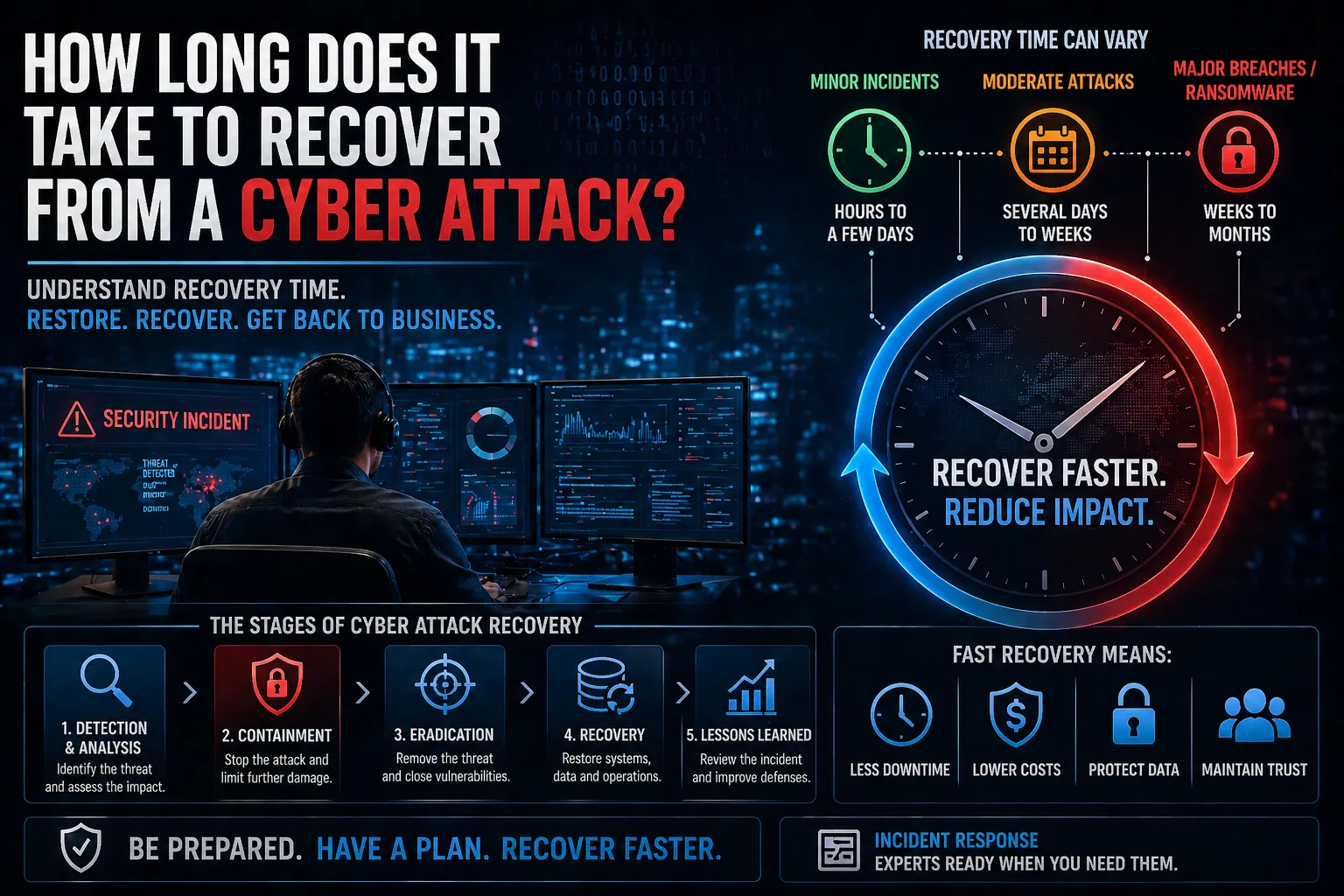
    How Long Does Recovery Take?

    Recovery time can vary significantly depending on the severity of the attack.

    General timeframes:

    • Minor incidents – Hours to a few days
    • Moderate attacks – Several days to weeks
    • Major breaches or ransomware – Weeks to months

    In some cases, full recovery — including reputational and operational impact — can take even longer.


    What Affects Cyber Attack Recovery Time?

    Several factors influence how quickly a business can recover.

    Key factors include:

    • Type of attack – Ransomware, data breach or system compromise
    • Detection speed – How quickly the attack is identified
    • Preparedness – Incident response plans and procedures
    • System complexity – Size and structure of the environment
    • Backup availability – Access to clean, recent backups

    Organisations with strong preparation recover significantly faster.


    The Stages of Cyber Attack Recovery

    1. Detection and Analysis

    Identifying the attack and understanding its scope.

    2. Containment

    Limiting the spread of the attack to prevent further damage.

    3. Eradication

    Removing malware, unauthorised access and vulnerabilities.

    4. Recovery

    Restoring systems, data and operations.

    5. Lessons Learned

    Reviewing the incident to improve future security.


    Why Fast Recovery Matters

    Delays in recovery can have serious consequences for businesses.

    Key risks of slow recovery:

    • Operational downtime – Disrupts business continuity
    • Financial loss – Lost revenue and recovery costs
    • Data loss – Permanent loss of sensitive information
    • Reputational damage – Loss of customer trust

    How to Reduce Recovery Time

    Organisations can significantly reduce recovery time with the right preparation.

    1. Develop and test an incident response plan
    2. Implement continuous monitoring and detection
    3. Maintain secure, up-to-date backups
    4. Apply strong access controls and segmentation
    5. Train staff to recognise and report threats

    Preparation is the biggest factor in reducing recovery time.


    How Recovery Fits into Cyber Security Strategy

    Recovery is a critical part of a broader cyber security strategy.

    It works alongside:

    • Incident Response for containment and recovery
    • Threat detection and monitoring
    • Security operations and alerting
    • Backup and disaster recovery planning

    These elements ensure organisations can respond quickly and recover effectively.


    Conclusion

    So, how long does it take to recover from a cyber attack?

    It depends on the severity of the incident and how prepared your organisation is.

    With the right processes in place, businesses can:

    • Reduce downtime
    • Limit financial impact
    • Restore operations faster
    • Strengthen future resilience

    FAQs

    How long does it take to recover from a cyber attack?

    Recovery can take anywhere from hours to months depending on the severity and preparedness of the organisation.

    What is the biggest factor affecting recovery time?

    Preparedness, including incident response planning and backups, has the biggest impact.

    Can businesses recover quickly from ransomware?

    Yes, if they have secure backups and a tested recovery plan in place.

    How can you reduce cyber attack recovery time?

    By improving detection, response processes, backups and overall security posture.

  • What is a SOC (Security Operations Centre)?

    What is a SOC (Security Operations Centre)?

    Introduction

    As cyber threats continue to evolve, organisations need more than just basic security tools — they need continuous monitoring, detection and response capabilities.

    This is where a Security Operations Centre (SOC) plays a critical role.

    So, what is a SOC, and how does it help protect businesses from cyber threats?

    This guide explains what a SOC is, how it works, and why it’s essential for modern cyber security.


    What is a SOC?

    A Security Operations Centre (SOC) is a centralised function responsible for monitoring, detecting, analysing and responding to cyber security threats in real time.

    A SOC combines people, processes and technology to provide continuous protection across an organisation’s systems and networks.

    Core SOC functions include:

    • Threat monitoring and detection
    • Incident response and containment
    • Log analysis and threat intelligence
    • Security alert management
    • Continuous security improvement

    The goal of a SOC is to identify and respond to threats before they cause significant damage.


    How a SOC Works

    A SOC operates 24/7, monitoring systems and analysing data to detect suspicious activity.

    Key components include:

    • SIEM (Security Information and Event Management) – Collects and analyses logs
    • Threat intelligence – Provides context on emerging threats
    • Security analysts – Investigate and respond to alerts
    • Automation tools – Improve response speed and efficiency

    These components work together to detect and respond to threats in real time.


    Key SOC Functions

    1. Continuous Monitoring

    The SOC monitors networks, systems and endpoints for suspicious activity.

    2. Threat Detection

    Security tools and analysts identify potential threats based on behaviour and indicators.

    3. Incident Response

    When a threat is detected, the SOC takes action to contain and mitigate it.

    4. Threat Intelligence

    The SOC uses intelligence feeds to stay ahead of emerging threats.

    5. Reporting and Improvement

    Incidents are analysed to improve future detection and response.


    Why a SOC is Important

    Cyber attacks can happen at any time, and many go undetected without proper monitoring.

    Key benefits:

    • 24/7 protection – Continuous monitoring of systems
    • Faster detection – Identify threats early
    • Rapid response – Contain incidents quickly
    • Reduced risk – Minimise impact of attacks
    • Improved visibility – Gain insight into security posture

    Types of SOC Models

    1. In-House SOC

    Built and managed internally by an organisation.

    2. Managed SOC

    Outsourced to a specialised security provider.

    3. Hybrid SOC

    A combination of internal teams and external providers.


    Common SOC Challenges

    Operating a SOC can be complex and resource-intensive.

    Challenges include:

    • Alert fatigue from high volumes of data
    • Shortage of skilled security professionals
    • Tool integration complexity
    • Maintaining 24/7 coverage

    These challenges often lead organisations to adopt managed SOC services.


    How a SOC Fits into Cyber Security Strategy

    A SOC is a core component of a modern cyber security strategy.

    It works alongside:

    • Security Operations for continuous monitoring
    • Incident response processes
    • Threat detection and intelligence
    • Network and endpoint security controls

    Together, these capabilities help organisations detect, respond to and prevent cyber attacks.


    Conclusion

    So, what is a SOC?

    It’s a centralised function that provides continuous monitoring, threat detection and incident response to protect organisations from cyber threats.

    By implementing a SOC, businesses can:

    • Detect threats earlier
    • Respond faster to incidents
    • Reduce cyber risk
    • Improve overall security posture

    FAQs

    What is a SOC in cyber security?

    A SOC is a centralised team responsible for monitoring and responding to security threats.

    What does a SOC do?

    It monitors systems, detects threats and responds to incidents in real time.

    Do all businesses need a SOC?

    Most organisations benefit from SOC capabilities, either in-house or managed.

    What tools does a SOC use?

    Common tools include SIEM platforms, threat intelligence feeds and monitoring systems.

  • Signs Your Business Has Been Hacked (Early Warning Signs)

    Introduction

    Cyber attacks rarely happen all at once. In most cases, there are early warning signs that something isn’t right — but they are often missed or ignored.

    Recognising these signals early can be the difference between a minor incident and a major breach.

    So, what are the signs of a cyber attack, and how can you spot them before it’s too late?

    This guide outlines the most common warning signs and what to do if you suspect your business has been compromised.


    Signs of a Cyber Attack

    Signs of a cyber attack are unusual behaviours or system changes that indicate unauthorised access or malicious activity.

    These signs can appear across systems, networks and user accounts.

    Common indicators include:

    • Unexpected system behaviour
    • Unusual login activity
    • Slow performance or outages
    • Unknown files or programs
    • Suspicious network traffic

    Identifying these signs early is critical to limiting damage.


    1. Unusual Login Activity

    One of the earliest signs of a cyber attack is suspicious login behaviour.

    Examples:

    • Logins from unfamiliar locations
    • Multiple failed login attempts
    • Access outside normal business hours

    This may indicate compromised credentials or unauthorised access.


    2. Unexpected System Slowdowns

    If systems suddenly become slow or unresponsive, it could be due to malicious activity.

    Possible causes:

    • Malware running in the background
    • Cryptocurrency mining
    • Distributed denial-of-service (DDoS) activity

    Performance issues should always be investigated.


    3. Unknown Files or Software

    Attackers often install tools to maintain access or move within a network.

    Watch for:

    • New or unfamiliar programs
    • Unexpected file changes
    • Files appearing in unusual locations

    These may indicate malware or unauthorised activity.


    4. Suspicious Network Activity

    Unusual network traffic can be a strong indicator of compromise.

    Examples:

    • Large amounts of outbound data
    • Connections to unknown IP addresses
    • Unusual internal traffic patterns

    This may indicate data exfiltration or lateral movement.


    5. Unexplained Account Changes

    Changes to user accounts or permissions can signal a breach.

    Look for:

    • New admin accounts
    • Password changes without authorisation
    • Permission escalations

    Attackers often modify accounts to maintain access.


    6. Security Alerts and Warnings

    Security tools often detect early signs of compromise.

    Examples:

    • Antivirus or endpoint alerts
    • Firewall warnings
    • Suspicious activity notifications

    Ignoring these alerts can allow attacks to progress.


    7. Ransomware or Locked Files

    In more advanced stages, attacks may become obvious.

    Indicators include:

    • Files being encrypted
    • Ransom notes appearing
    • Loss of access to systems

    At this point, immediate action is required.


    Why Early Detection Matters

    The earlier a cyber attack is detected, the less damage it can cause.

    Key benefits of early detection:

    • Reduced impact – Limits damage to systems and data
    • Faster response – Enables quicker containment
    • Lower recovery costs
    • Improved business continuity

    What to Do If You Suspect a Cyber Attack

    If you notice any signs of a cyber attack, take immediate action.

    1. Isolate affected systems
    2. Change compromised credentials
    3. Preserve logs and evidence
    4. Notify internal stakeholders
    5. Engage security professionals

    A fast, structured response is critical.


    How This Fits into Cyber Security Strategy

    Detecting cyber attacks requires a combination of monitoring and response capabilities.

    These capabilities help organisations detect and respond to threats before they escalate.


    Conclusion

    So, what are the signs of a cyber attack?

    They are early warning signals that indicate suspicious activity, compromised systems or unauthorised access.

    By recognising these signs early, organisations can:

    • Detect attacks faster
    • Reduce damage
    • Protect sensitive data
    • Strengthen overall security posture

    FAQs

    What are the first signs of a cyber attack?

    Unusual logins, system slowdowns and suspicious activity are common early indicators.

    How do you know if your business has been hacked?

    Signs include unknown files, account changes, security alerts and unusual network activity.

    What should you do if you suspect a cyber attack?

    Isolate systems, secure accounts and initiate an incident response process immediately.

    Can cyber attacks go unnoticed?

    Yes — many attacks remain undetected for long periods without proper monitoring.

  • How Hackers Move Through Networks (Lateral Movement Explained)

    How Hackers Move Through Networks (Lateral Movement Explained)

    Introduction

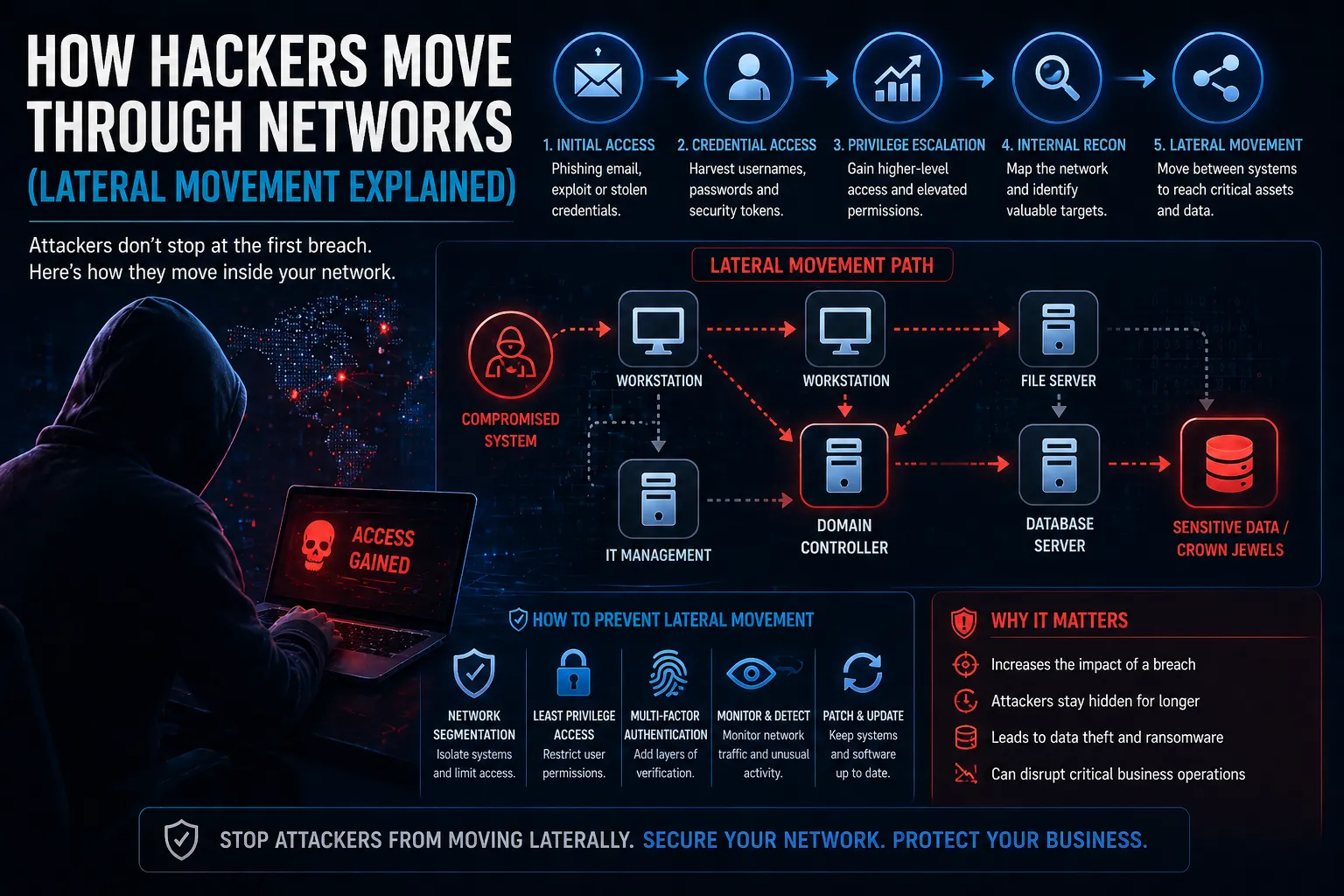
    As cyber attacks become more advanced, gaining initial access is often just the beginning. Once inside a network, attackers don’t stop — they move deeper to find sensitive systems, data and privileged accounts.

    This is known as lateral movement, and it’s one of the most dangerous stages of a cyber attack.

    So, what is lateral movement in a cyber attack, and how does it work?

    This guide explains how attackers move through networks, the techniques they use, and how organisations can stop them.


    Lateral Movement Explained

    Lateral movement in a cyber attack refers to the techniques attackers use to move from one system to another after gaining initial access.

    Instead of staying on a single compromised machine, attackers expand their reach to:

    • Access sensitive data
    • Escalate privileges
    • Compromise critical systems
    • Maintain persistence within the network

    This allows attackers to maximise impact and avoid detection.


    How Lateral Movement Works

    Once inside a network, attackers follow a structured approach to move across systems.

    Typical stages include:

    • Initial compromise – Gaining access via phishing, exploits or stolen credentials
    • Credential harvesting – Collecting usernames, passwords or tokens
    • Privilege escalation – Gaining higher-level access
    • Internal reconnaissance – Mapping the network and identifying targets
    • Lateral movement – Moving between systems

    This process continues until attackers reach high-value assets.


    Common Lateral Movement Techniques

    Attackers use a variety of tools and methods to move through networks.

    Examples include:

    • Pass-the-Hash – Using stolen password hashes to authenticate
    • Remote Desktop Protocol (RDP) – Accessing systems remotely
    • PsExec – Executing commands on remote machines
    • Credential dumping – Extracting login details from memory
    • Exploiting trust relationships – Moving between connected systems

    These techniques allow attackers to blend in with normal network activity.


    Why Lateral Movement Matters

    Lateral movement significantly increases the impact of a cyber attack.

    Without controls in place, attackers can move freely across systems.

    Key risks:

    • Wider breach impact – More systems become compromised
    • Data exfiltration – Sensitive data is accessed and stolen
    • Privilege escalation – Attackers gain admin-level control
    • Longer dwell time – Attacks go undetected for longer

    How to Detect Lateral Movement

    Detecting lateral movement requires visibility across your network.

    Key indicators include:

    • Unusual login activity
    • Access from unexpected locations
    • Multiple failed login attempts
    • Unusual internal traffic patterns
    • Unexpected privilege escalation

    Monitoring these signals helps identify attackers before they reach critical systems.


    How to Prevent Lateral Movement

    Preventing lateral movement requires a layered security approach.

    1. Implement network segmentation
    2. Apply least privilege access controls
    3. Use multi-factor authentication (MFA)
    4. Monitor network activity continuously
    5. Secure credentials and rotate regularly
    6. Patch vulnerabilities promptly

    These controls limit how far attackers can move within your environment.


    Lateral Movement and Cyber Security Strategy

    Lateral movement is a key focus in modern cyber security strategies.

    It is addressed through:

    Combining these controls reduces the likelihood and impact of lateral movement attacks.


    Conclusion

    So, what is lateral movement in a cyber attack?

    It’s the process attackers use to move through networks after gaining access, allowing them to expand control and reach critical systems.

    By understanding how lateral movement works, organisations can:

    • Detect threats earlier
    • Limit breach impact
    • Protect sensitive systems
    • Strengthen overall cyber resilience

    FAQs

    What is lateral movement in cyber security?

    It is when attackers move between systems within a network after gaining initial access.

    Why is lateral movement dangerous?

    It allows attackers to spread across systems, access sensitive data and escalate privileges.

    How do attackers move laterally?

    They use techniques like credential theft, RDP access and exploiting trust relationships.

    How do you stop lateral movement?

    By using network segmentation, monitoring, MFA and strong access controls.

  • What is Network Segmentation? (And Why It Matters)

    What is Network Segmentation? (And Why It Matters)

    Introduction

    As cyber threats become more sophisticated, relying on a single perimeter defence is no longer enough. Once attackers gain access to a network, they often move laterally to access sensitive systems and data.

    This is where network segmentation becomes critical.

    So, what is network segmentation, and why does it matter for modern businesses?

    This guide explains the concept, how it works, and why it’s essential for reducing cyber risk.


    Network Segmentation Explained

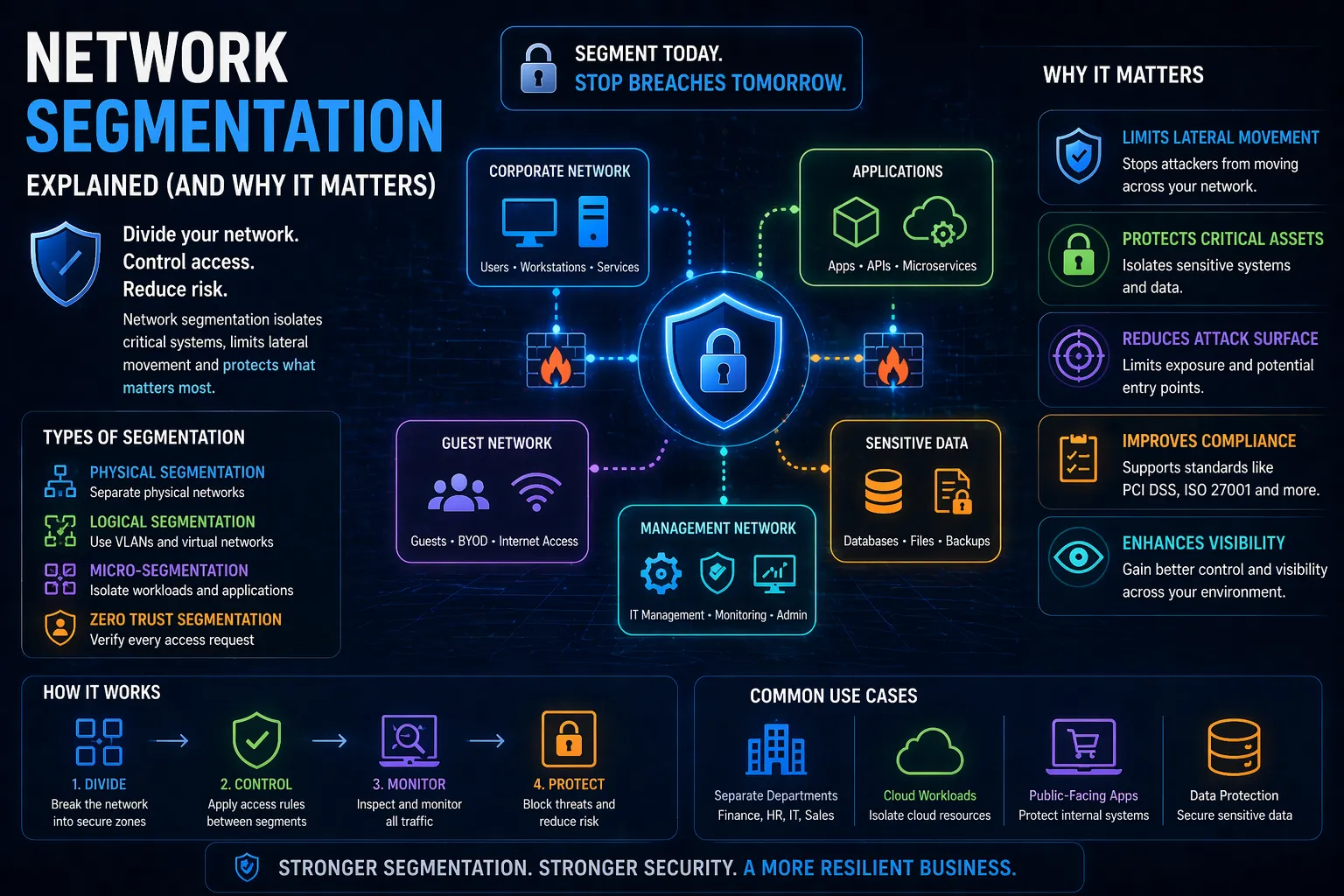
    Network segmentation is the practice of dividing a network into smaller, isolated segments to control traffic flow and limit access between systems.

    Instead of one large, flat network, segmentation creates separate zones, each with its own security controls.

    Example:

    • Finance systems in one segment
    • HR systems in another
    • Public-facing applications in a separate zone

    Access between these segments is tightly controlled.


    How Network Segmentation Works

    Network segmentation uses a combination of technologies and policies to isolate systems and manage traffic.

    Key components include:

    • Firewalls – Control traffic between segments
    • VLANs (Virtual Local Area Networks) – Separate network traffic logically
    • Access control policies – Define who can access what
    • Zero Trust principles – Verify every request

    Traffic between segments is inspected and restricted based on predefined rules.


    Why Network Segmentation Matters

    Without segmentation, once an attacker gains access, they can move freely across the network.

    Segmentation helps prevent this.

    Key benefits:

    • Limits lateral movement – Stops attackers spreading across systems
    • Protects sensitive data – Isolates critical assets
    • Reduces attack surface – Minimises exposure
    • Improves compliance – Supports standards like PCI DSS and ISO 27001
    • Enhances visibility and control

    Types of Network Segmentation

    1. Physical Segmentation

    Separate physical networks and hardware.

    2. Logical Segmentation

    Uses VLANs and software-defined networking (SDN).

    3. Micro-Segmentation

    Granular control at the workload or application level.

    4. Zero Trust Segmentation

    Strict access controls based on identity and context.


    Network Segmentation vs Zero Trust

    While related, they are not the same.

    • Network segmentation divides the network into zones
    • Zero Trust ensures every access request is verified

    Modern security strategies often combine both.


    Common Network Segmentation Mistakes

    Even with segmentation, poor implementation can introduce risk.

    Common issues:

    • Overly permissive access between segments
    • Lack of monitoring
    • Misconfigured firewalls
    • Inconsistent policies

    These mistakes can undermine the effectiveness of segmentation.


    How to Implement Network Segmentation

    To implement segmentation effectively:

    1. Identify critical assets and systems
    2. Define security zones
    3. Apply least privilege access controls
    4. Use firewalls and VLANs to enforce boundaries
    5. Monitor traffic between segments
    6. Regularly review and update policies

    How Network Segmentation Fits into Cyber Security

    Network segmentation is a core part of a broader security strategy.

    It works alongside:

    • Network security controls
    • Threat detection and monitoring
    • Access management
    • Incident response

    If you want to reduce risk and improve control across your environment, implementing Network Security solutions including segmentation is essential.


    Conclusion

    So, what is network segmentation?

    It’s a powerful method of dividing networks into controlled zones to reduce risk and limit attacker movement.

    By implementing segmentation, organisations can:

    • Protect sensitive systems
    • Reduce breach impact
    • Improve security visibility
    • Strengthen overall cyber resilience

    FAQs

    What is network segmentation in simple terms?

    It’s the process of dividing a network into smaller sections to control access and improve security.

    Why is network segmentation important?

    It prevents attackers from moving freely across a network after gaining access.

    What is micro-segmentation?

    A more advanced form of segmentation that isolates workloads or applications.

    Is network segmentation part of Zero Trust?

    Yes — it’s often used as part of a Zero Trust security model.

  • Azure Security Best Practices for Businesses

    Azure Security Best Practices for Businesses

    Introduction

    Microsoft Azure is one of the most widely used cloud platforms, offering flexibility, scalability and powerful services. However, like all cloud environments, security depends heavily on how it’s configured.

    Many organisations assume Azure is secure by default — but misconfigurations, poor access control and lack of monitoring can introduce serious risks.

    This guide covers the most important Azure security best practices to help businesses protect their cloud environments and reduce exposure to cyber threats.


    Understanding the Azure Shared Responsibility Model

    Before implementing security controls, it’s essential to understand the shared responsibility model:

    • Microsoft secures the cloud infrastructure
    • You are responsible for securing your data, applications and configurations

    Failing to manage your responsibilities is one of the most common causes of cloud security incidents.


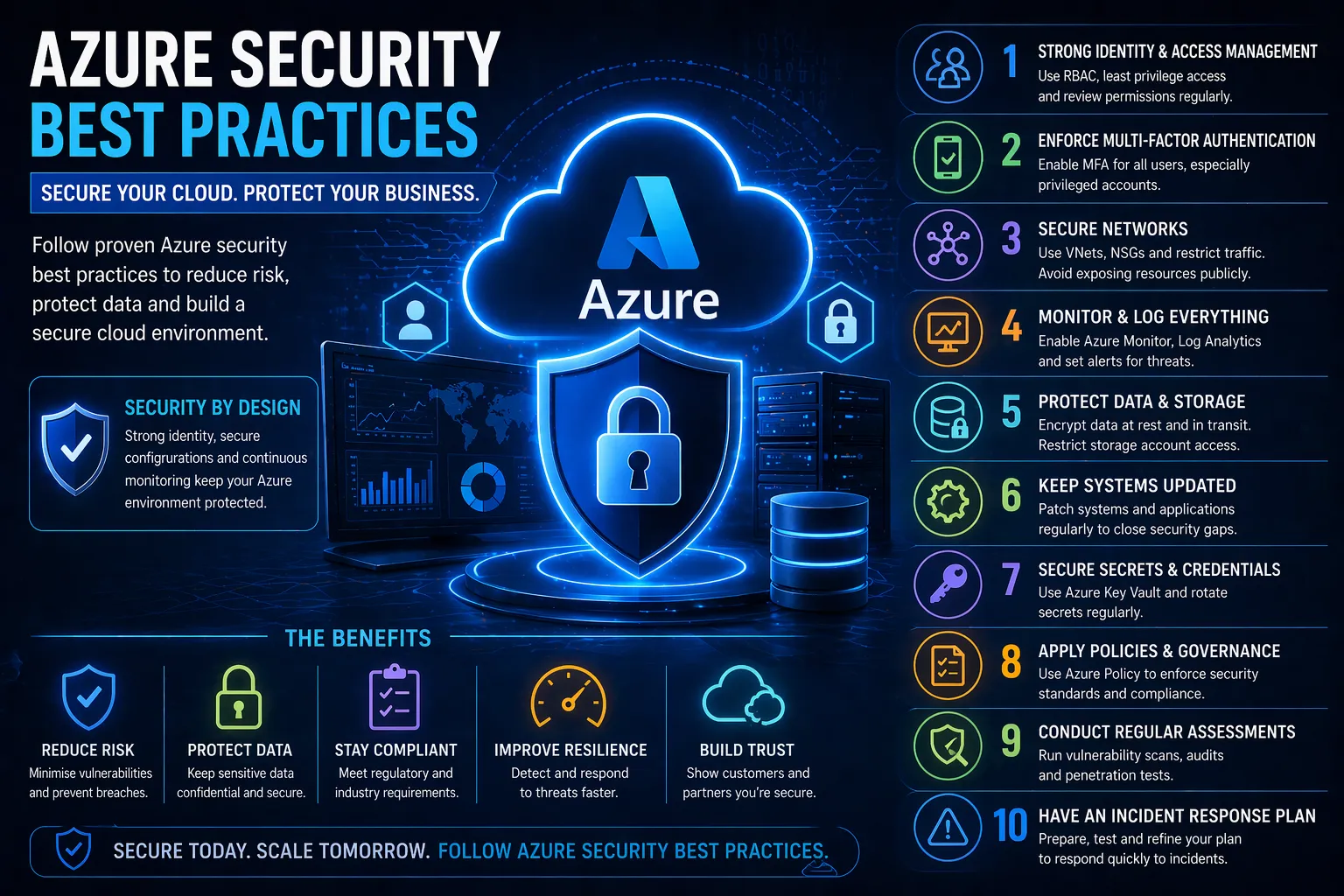
    1. Implement Strong Identity and Access Management (IAM)

    Identity is the foundation of Azure security.

    Best practices:

    • Apply least privilege access
    • Use role-based access control (RBAC)
    • Avoid shared accounts
    • Regularly review permissions

    Why it matters:

    Compromised identities are one of the most common attack vectors in cloud environments.


    2. Enforce Multi-Factor Authentication (MFA)

    Best practices:

    • Enable MFA for all users
    • Enforce MFA for privileged accounts
    • Use conditional access policies

    Why it matters:

    Passwords alone are not enough — MFA significantly reduces the risk of account compromise.


    3. Use Network Segmentation and Security Controls

    Best practices:

    • Use Virtual Networks (VNets) to isolate resources
    • Implement Network Security Groups (NSGs)
    • Restrict inbound and outbound traffic
    • Avoid exposing services directly to the internet

    Why it matters:

    Network segmentation limits lateral movement and reduces attack surfaces.


    4. Enable Logging and Continuous Monitoring

    Best practices:

    • Enable Azure Monitor and Log Analytics
    • Use Microsoft Defender for Cloud
    • Set up alerts for suspicious activity

    Why it matters:

    Without visibility, threats can go undetected.


    5. Secure Storage and Data

    Best practices:

    • Encrypt data at rest and in transit
    • Restrict access to storage accounts
    • Avoid public exposure of data

    Why it matters:

    Data breaches often result from improperly secured storage.


    6. Regularly Patch and Update Systems

    Best practices:

    • Keep virtual machines updated
    • Apply security patches promptly
    • Automate updates where possible

    Why it matters:

    Unpatched systems are vulnerable to known exploits.


    7. Protect Secrets and Credentials

    Best practices:

    • Use Azure Key Vault
    • Avoid hardcoding credentials
    • Rotate secrets regularly

    Why it matters:

    Exposed credentials can provide attackers with direct access.


    8. Implement Security Policies and Governance

    Best practices:

    • Use Azure Policy to enforce standards
    • Apply compliance frameworks
    • Regularly audit configurations

    Why it matters:

    Consistency is key to maintaining security across environments.


    9. Conduct Regular Security Assessments

    Best practices:

    • Perform vulnerability scanning
    • Conduct penetration testing
    • Review configurations regularly

    Why it matters:

    Continuous assessment helps identify risks before attackers do.


    10. Develop an Incident Response Plan

    Best practices:

    • Define roles and responsibilities
    • Create response procedures
    • Test your plan regularly

    Why it matters:

    A fast response reduces the impact of security incidents.


    How to Improve Azure Security

    To strengthen your Azure environment:

    • Monitor continuously
    • Enforce strong identity controls
    • Audit configurations regularly
    • Follow security best practices from the start

    Cloud security is not a one-time task — it requires ongoing management and improvement.

    If you want to ensure your Azure environment is properly secured, integrating these practices into a broader Cloud Security strategy is essential.


    Conclusion

    Azure provides powerful tools and infrastructure — but security depends on how you use them.

    By following these Azure security best practices, businesses can:

    • Reduce risk
    • Protect sensitive data
    • Maintain compliance
    • Strengthen their overall cloud security posture

    FAQs

    What are Azure security best practices?

    They include strong identity management, MFA, network segmentation, monitoring, encryption and regular assessments.

    Is Azure secure by default?

    Azure infrastructure is secure, but customers must configure their environments properly.

    What is the biggest Azure security risk?

    Misconfiguration and weak identity controls are the most common risks.

    How do you secure Azure environments?

    By implementing IAM, monitoring, encryption, policies and continuous security assessments.

  • Common AWS Security Mistakes (And How to Fix Them)

    Common AWS Security Mistakes (And How to Fix Them)

    Introduction

    Amazon Web Services (AWS) powers a huge portion of modern infrastructure — but with flexibility comes risk. Many security incidents in the cloud are not due to AWS itself, but misconfigurations and poor security practices.

    So what are the most common AWS security mistakes, and how can you avoid them?

    This guide breaks down the biggest risks and how to fix them before they lead to breaches.


    Why AWS Security Mistakes Happen

    AWS operates under a shared responsibility model:

    • AWS secures the cloud infrastructure
    • You are responsible for securing what you put in the cloud

    Most security issues occur when organisations misunderstand this model or fail to implement proper controls.


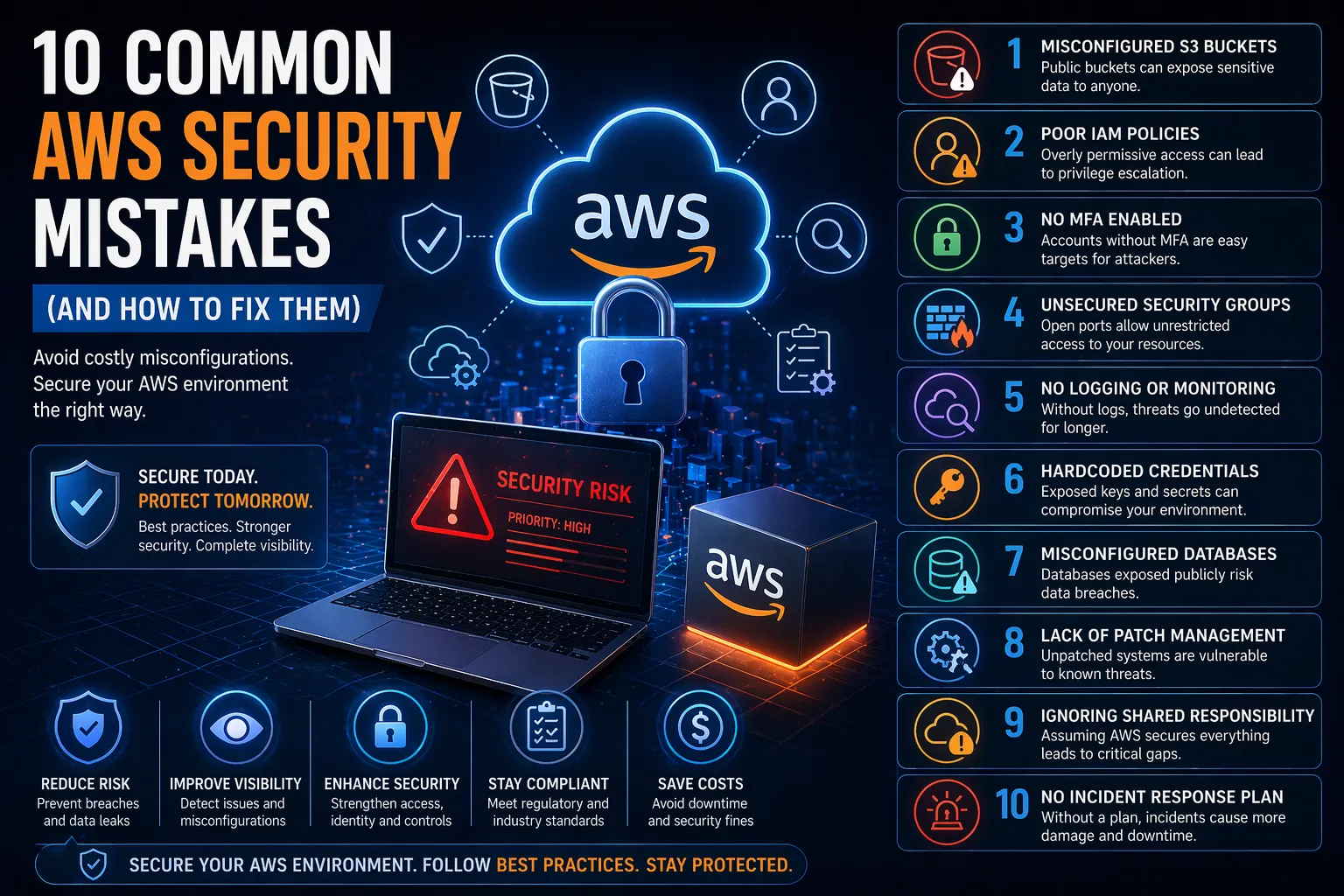
    1. Misconfigured S3 Buckets

    The Problem

    Publicly exposed S3 buckets are one of the most common AWS security mistakes, often leading to data leaks.

    The Risk

    Sensitive data becomes accessible to anyone on the internet.

    How to Fix It

    • Disable public access by default
    • Use bucket policies and IAM controls
    • Enable logging and monitoring

    2. Poor Identity and Access Management (IAM)

    The Problem

    Overly permissive roles and excessive user privileges.

    The Risk

    Attackers can escalate privileges and access critical systems.

    How to Fix It

    • Apply least privilege access
    • Use role-based access instead of shared accounts
    • Regularly audit IAM policies

    3. Lack of Multi-Factor Authentication (MFA)

    The Problem

    Accounts protected only by passwords.

    The Risk

    Credential theft can lead to full account compromise.

    How to Fix It

    • Enforce MFA for all users
    • Especially for admin and root accounts

    4. Unsecured Security Groups

    The Problem

    Open ports (e.g. 0.0.0.0/0) exposing services to the internet.

    The Risk

    Attackers can directly access servers and applications.

    How to Fix It

    • Restrict IP ranges
    • Use private networks where possible
    • Regularly review firewall rules

    5. No Logging or Monitoring

    The Problem

    Lack of visibility into activity across AWS environments.

    The Risk

    Breaches go undetected for extended periods.

    How to Fix It

    • Enable AWS CloudTrail
    • Use CloudWatch for monitoring
    • Implement alerting for suspicious activity

    6. Hardcoded Credentials

    The Problem

    API keys and secrets stored in code or repositories.

    The Risk

    Attackers can gain direct access to AWS services.

    How to Fix It

    • Use AWS Secrets Manager or Parameter Store
    • Rotate credentials regularly
    • Avoid storing secrets in code

    7. Misconfigured Storage and Databases

    The Problem

    Databases and storage services exposed without proper controls.

    The Risk

    Sensitive data exposure and compliance violations.

    How to Fix It

    • Restrict access using IAM and network controls
    • Encrypt data at rest and in transit
    • Regularly audit configurations

    8. Lack of Patch Management

    The Problem

    Outdated instances and unpatched systems.

    The Risk

    Known vulnerabilities can be exploited.

    How to Fix It

    • Regularly update systems
    • Automate patching where possible
    • Use vulnerability scanning

    9. Overlooking the Shared Responsibility Model

    The Problem

    Assuming AWS handles all security.

    The Risk

    Critical gaps in application and data protection.

    How to Fix It

    • Understand AWS responsibilities vs yours
    • Implement security controls at every layer

    10. No Incident Response Plan

    The Problem

    No defined process for responding to breaches.

    The Risk

    Delayed response increases impact and damage.

    How to Fix It

    • Develop an incident response plan
    • Test it regularly
    • Ensure clear roles and responsibilities

    How to Prevent AWS Security Mistakes

    To reduce risk, organisations should:

    • Regularly audit cloud configurations
    • Implement continuous monitoring
    • Use automated security tools
    • Follow best practice frameworks

    Most importantly, security should be built into your cloud environment from the start — not added later.

    If you’re looking to secure your AWS environment properly, integrating these controls into a broader Cloud Security strategy is essential.


    Conclusion

    AWS is secure by design — but only if configured correctly.

    The most common AWS security mistakes are preventable with the right controls, visibility and processes.

    By addressing these risks early, organisations can:

    • Protect sensitive data
    • Reduce breach risk
    • Maintain compliance
    • Strengthen overall cloud security

    FAQs

    What are the most common AWS security mistakes?

    Misconfigured S3 buckets, poor IAM policies, lack of MFA, and insufficient monitoring are among the most common.

    Is AWS secure by default?

    AWS infrastructure is secure, but customers must configure their environments properly.

    What is the biggest AWS security risk?

    Misconfiguration — particularly public exposure of data and services.

    How do you secure AWS environments?

    Through proper IAM controls, monitoring, encryption, and continuous security assessments.

  • What Happens During a Penetration Test? Step-by-Step Guide

    What Happens During a Penetration Test? Step-by-Step Guide

    Introduction

    If you’re considering a penetration test, one of the most common questions is: what happens in a penetration test?

    Understanding the process helps businesses prepare, reduce risk, and get the most value from security testing.

    This guide walks you through each stage of a penetration test, from planning to reporting, so you know exactly what to expect.


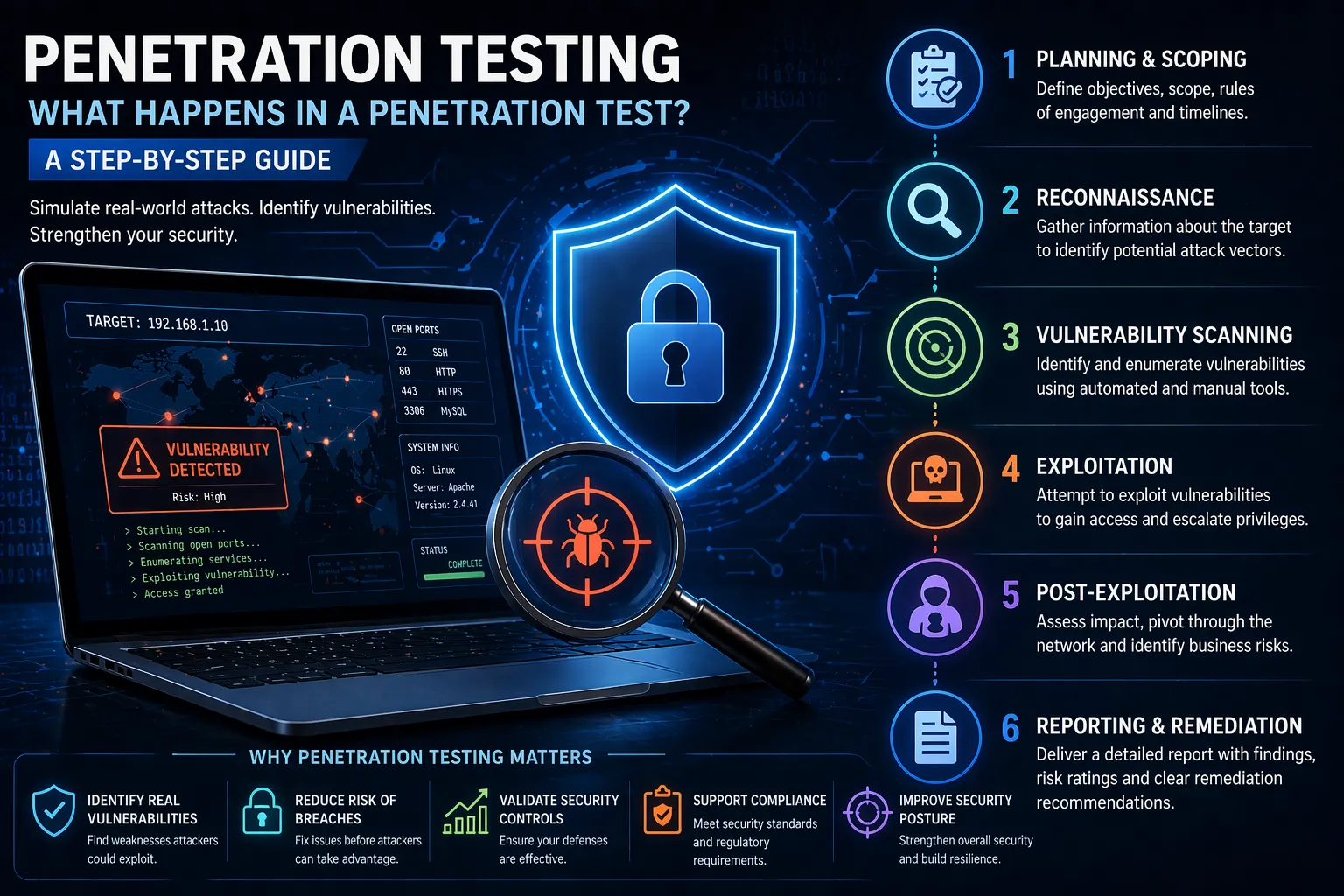
    What Happens in a Penetration Test?

    A penetration test (pen test) is a simulated cyber attack designed to identify vulnerabilities in systems, networks or applications before real attackers can exploit them.

    Penetration testing follows a structured process that typically includes:

    1. Planning and scoping
    2. Reconnaissance
    3. Vulnerability scanning
    4. Exploitation
    5. Post-exploitation
    6. Reporting and remediation

    Step 1: Planning and Scoping

    Every penetration test begins with defining the scope and objectives.

    This includes:

    • Identifying systems to be tested
    • Defining testing methods (black box, grey box, white box)
    • Setting rules of engagement
    • Establishing timelines

    Clear scoping ensures the test is effective and avoids unintended disruption.


    Step 2: Reconnaissance (Information Gathering)

    In this phase, testers gather information about the target system.

    This may include:

    • Domain and DNS data
    • Public-facing assets
    • Employee or organisational data
    • Network structure

    Reconnaissance helps testers understand potential entry points — just like a real attacker would.


    Step 3: Vulnerability Scanning

    Next, automated and manual tools are used to identify known vulnerabilities.

    This includes:

    • Outdated software
    • Misconfigurations
    • Open ports and services
    • Weak authentication mechanisms

    This stage builds a list of potential weaknesses to explore further.


    Step 4: Exploitation

    This is where the actual “attack” happens.

    Testers attempt to exploit identified vulnerabilities to:

    • Gain unauthorised access
    • Escalate privileges
    • Access sensitive data
    • Bypass security controls

    All exploitation is performed safely and within agreed boundaries.


    Step 5: Post-Exploitation

    Once access is gained, testers assess the potential impact.

    This includes:

    • Determining how far access can spread
    • Identifying sensitive data exposure
    • Testing persistence mechanisms
    • Evaluating business risk

    This stage answers the critical question: what could an attacker actually do?


    Step 6: Reporting and Remediation

    After testing is complete, a detailed report is provided.

    This includes:

    • Identified vulnerabilities
    • Risk severity ratings
    • Proof of exploitation
    • Step-by-step remediation guidance

    The report helps organisations prioritise fixes and improve their security posture.


    Why Penetration Testing is Important

    Penetration testing provides real-world insight into your security posture.

    Key benefits:

    • Identifies exploitable vulnerabilities
    • Validates existing security controls
    • Reduces risk of data breaches
    • Supports compliance requirements
    • Improves overall security strategy

    Without penetration testing, organisations may not fully understand their exposure to real-world attacks.


    How Often Should You Perform a Penetration Test?

    Best practice is to conduct penetration testing:

    • Annually (at minimum)
    • After major system changes
    • When launching new applications
    • After security incidents

    Regular testing ensures your security keeps pace with evolving threats.


    Common Misconceptions About Penetration Testing

    “It’s just automated scanning”

    Penetration testing involves manual exploitation, not just automated tools.

    “It will break our systems”

    Professional testing is carefully controlled to avoid disruption.

    “We only need it once”

    Security is constantly changing — regular testing is essential.


    How Penetration Testing Fits into Cyber Security

    Penetration testing is a key part of a broader cyber security strategy.

    It works alongside:

    • Vulnerability scanning
    • Application security testing
    • Security monitoring
    • Compliance programs

    If you want to identify real-world risks and strengthen your defences, investing in Penetration Testing is essential.


    Conclusion

    So, what happens in a penetration test?

    It’s a structured process that simulates real-world attacks to uncover vulnerabilities, assess risk and improve security.

    By understanding each step, organisations can:

    • Prepare effectively
    • Reduce risk exposure
    • Strengthen their overall cyber security posture

    Penetration testing is one of the most effective ways to stay ahead of attackers.


    FAQs

    What happens during a penetration test?

    A penetration test involves planning, reconnaissance, scanning, exploitation, post-exploitation and reporting.

    How long does a penetration test take?

    It typically takes anywhere from a few days to several weeks depending on scope.

    Is penetration testing safe?

    Yes — when conducted by professionals, it is controlled and designed to avoid disruption.

    What is the difference between a pen test and vulnerability scan?

    A vulnerability scan identifies issues, while a pen test actively exploits them.

  • What is DAST? Dynamic Testing Explained for Beginners

    What is DAST? Dynamic Testing Explained for Beginners

    Introduction

    Modern applications are constantly exposed to cyber threats — from injection attacks to authentication flaws. While secure coding practices help reduce risk, vulnerabilities can still appear when applications are running.

    This is where Dynamic Application Security Testing (DAST) comes in.

    So, what is DAST, and how does it help secure applications in real-world environments?

    This guide breaks it down in simple terms, explains how it works, and shows why it’s essential for application security.


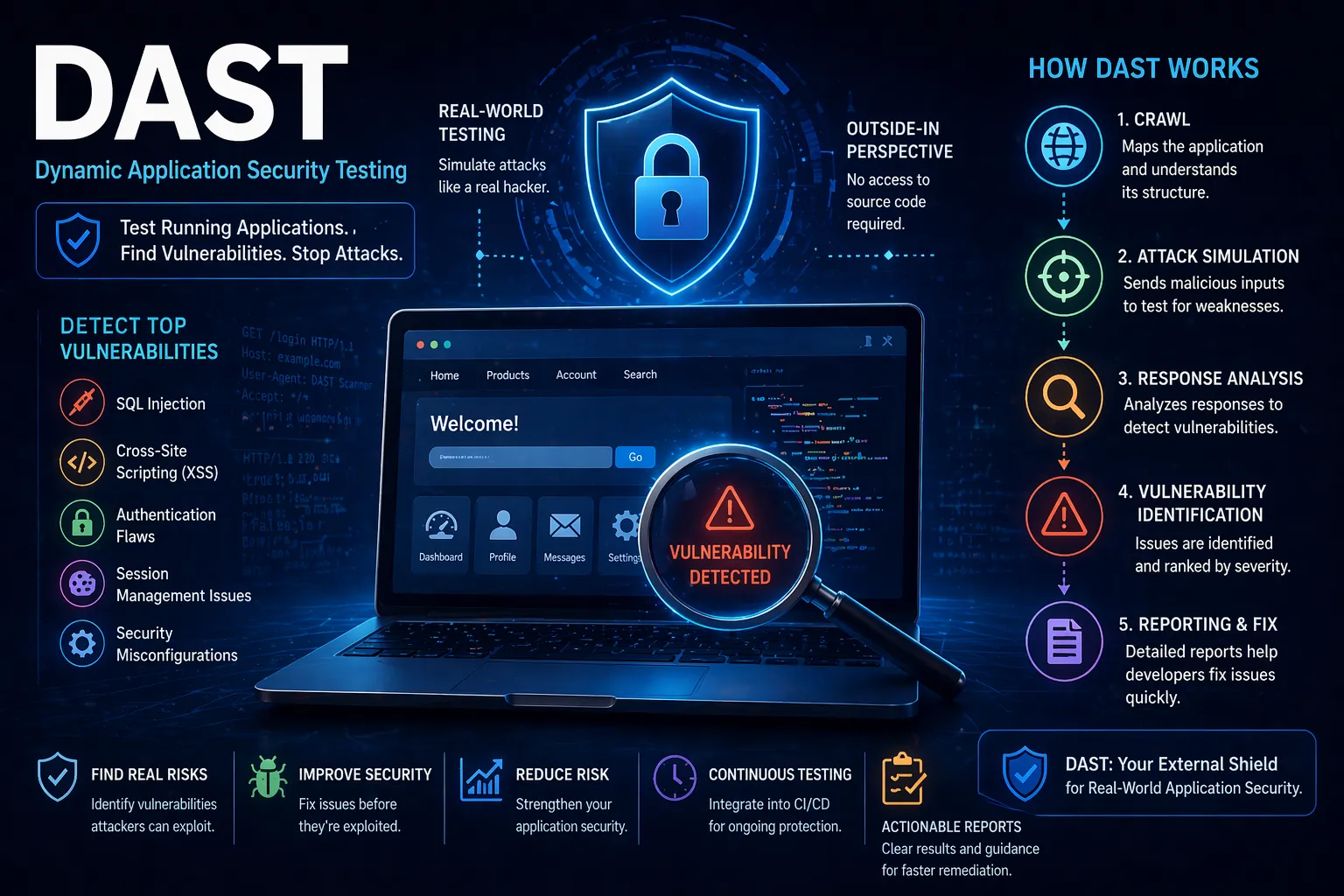
    What is DAST?

    DAST (Dynamic Application Security Testing) is a method of testing a running application to identify security vulnerabilities from the outside — just like an attacker would.

    Unlike SAST, DAST does not analyse source code. Instead, it interacts with the live application to uncover issues such as:

    • SQL injection
    • Cross-site scripting (XSS)
    • Authentication weaknesses
    • Session management flaws
    • Misconfigured security controls

    DAST is often referred to as “black-box testing” because it tests the application without needing access to the underlying code.


    How Does DAST Work?

    DAST tools simulate real-world attacks by interacting with a live application and analysing its responses.

    Step 1: Application Crawling

    The tool scans and maps the application to understand its structure, pages and inputs.

    Step 2: Attack Simulation

    It sends malicious or unexpected inputs to test how the application responds.

    Step 3: Response Analysis

    The tool analyses responses to detect vulnerabilities such as improper input handling or data exposure.

    Step 4: Vulnerability Identification

    Security issues are flagged and categorised by severity.

    Step 5: Reporting & Remediation

    Detailed reports are generated with guidance on fixing vulnerabilities.


    Why is DAST Important?

    DAST plays a crucial role in identifying vulnerabilities that only appear when an application is running.

    Key benefits include:

    • Real-world testing – Simulates how attackers interact with your application
    • Finds runtime vulnerabilities – Detects issues missed during development
    • No source code required – Ideal for third-party or legacy systems
    • Improves overall security posture

    Without DAST, organisations risk deploying applications with exploitable vulnerabilities.


    DAST vs SAST: What’s the Difference?

    DAST and SAST are often used together, but they serve different purposes.

    DAST SAST
    Tests running applications Tests source code
    Finds runtime vulnerabilities Finds issues early in development
    Black-box testing White-box testing
    No code access required Requires code access

    For best results, organisations should use both as part of a comprehensive security strategy.


    When Should You Use DAST?

    DAST is typically used later in the development lifecycle, including:

    • During staging or pre-production
    • In production (with safe configurations)
    • As part of continuous security testing

    This ensures vulnerabilities are identified before attackers can exploit them.


    Common Challenges with DAST

    While powerful, DAST has some limitations:

    • Cannot identify code-level issues
    • May miss vulnerabilities in untested paths
    • Requires a running application
    • Potential false positives

    These challenges are best addressed by combining DAST with other security testing methods.


    How DAST Fits into Application Security

    DAST is a key component of a broader application security strategy, helping organisations identify vulnerabilities in live environments.

    A complete approach includes:

    • Static testing (SAST)
    • Dynamic testing (DAST)
    • Penetration testing
    • Secure development practices
    • Continuous monitoring

    To fully protect your applications, DAST should be integrated alongside a comprehensive
    Application Security strategy.


    Conclusion

    So, what is DAST?

    It’s a powerful method of testing running applications to uncover vulnerabilities that attackers could exploit.

    By incorporating DAST into your security processes, you can:

    • Identify real-world vulnerabilities
    • Strengthen application resilience
    • Reduce risk before deployment

    For modern applications, DAST is an essential layer of defence.


    FAQs

    What is DAST in simple terms?

    DAST is a method of testing a running application to find security vulnerabilities.

    What types of vulnerabilities does DAST find?

    It detects issues like SQL injection, XSS, authentication flaws and misconfigurations.

    Does DAST require source code?

    No — DAST works without access to source code.

    Is DAST enough on its own?

    No — it should be combined with SAST and other security methods.

  • What is SAST and How Does It Work?

    What is SAST and How Does It Work?

    Introduction

    As organisations increasingly rely on software to power their operations, securing applications during development has become critical. One of the most effective ways to identify vulnerabilities early is through Static Application Security Testing (SAST).

    But what is SAST, and how does it actually work?

    This guide explains SAST in simple terms, how it fits into modern development workflows, and why it plays a key role in application security.


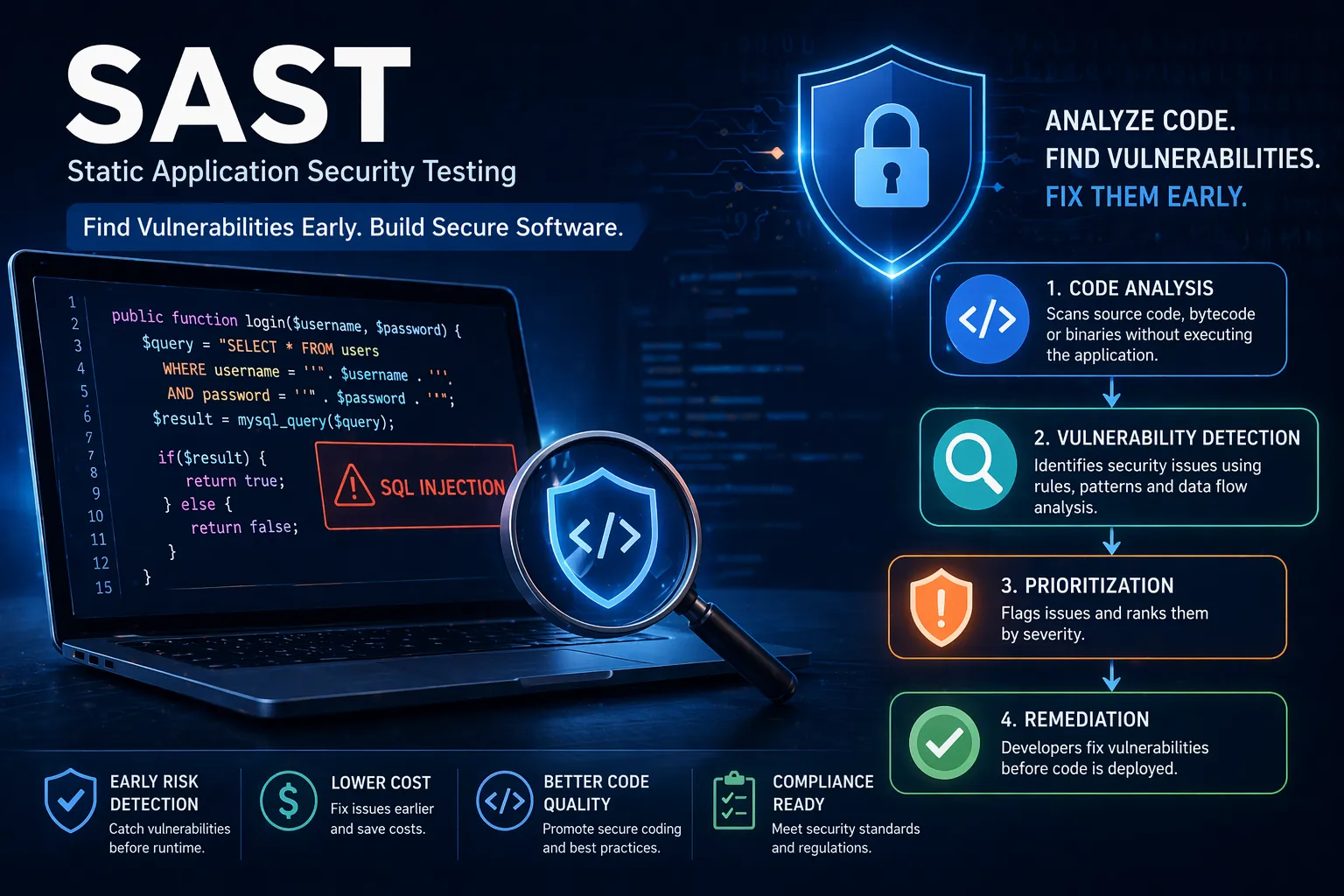
    What is SAST?

    SAST (Static Application Security Testing) is a method of analysing source code, bytecode or binaries to identify security vulnerabilities without executing the application.

    In other words, SAST scans your code before it runs to detect issues such as:

    • SQL injection vulnerabilities
    • Cross-site scripting (XSS) risks
    • Insecure authentication logic
    • Hardcoded credentials
    • Misconfigured security controls

    Because SAST works at the code level, it allows developers to identify and fix issues early in the development lifecycle.


    How Does SAST Work?

    SAST tools analyse code using a combination of rules, pattern matching and data flow analysis to identify potential vulnerabilities.

    Step 1: Code Analysis

    The tool scans source code or compiled code to understand its structure and logic.

    Step 2: Pattern Matching

    It compares code against known vulnerability patterns (e.g. unsafe input handling).

    Step 3: Data Flow Analysis

    The tool tracks how data moves through the application to identify insecure flows (e.g. user input reaching a database without validation).

    Step 4: Vulnerability Identification

    Potential issues are flagged and categorised by severity.

    Step 5: Reporting & Remediation

    Developers receive detailed reports with guidance on how to fix vulnerabilities.


    Why is SAST Important?

    SAST plays a critical role in modern software development by shifting security left — meaning earlier in the development lifecycle.

    Key benefits include:

    • Early vulnerability detection – Fix issues before they reach production
    • Reduced remediation costs – Cheaper to fix during development
    • Improved code quality – Enforces secure coding practices
    • Compliance support – Helps meet security standards and regulations

    Without SAST, vulnerabilities often go unnoticed until later stages, where they are more expensive and risky to resolve.


    SAST vs DAST: What’s the Difference?

    SAST is often compared with Dynamic Application Security Testing (DAST).

    SAST DAST
    Tests code without running it Tests a running application
    Identifies issues early Identifies runtime vulnerabilities
    Developer-focused Security/testing-focused
    Works during development Works during staging or production

    Both are important — but SAST is essential for catching vulnerabilities before deployment.


    When Should You Use SAST?

    SAST should be integrated throughout the development lifecycle, particularly:

    • During coding (IDE integrations)
    • In CI/CD pipelines
    • Before code merges or releases

    This ensures vulnerabilities are detected continuously, rather than as a one-off activity.


    Common Challenges with SAST

    While powerful, SAST does come with some limitations:

    • False positives – Some findings may not be real vulnerabilities
    • Requires developer understanding – Teams need to interpret results correctly
    • Limited runtime context – Cannot detect issues that only appear during execution

    These challenges are typically addressed by combining SAST with other testing methods and expert review.


    How SAST Fits into Application Security

    SAST is just one part of a broader application security strategy.

    A complete approach typically includes:

    • Static testing (SAST)
    • Dynamic testing (DAST)
    • Penetration testing
    • Secure code reviews
    • Ongoing monitoring

    If you’re looking to strengthen your software security posture, integrating SAST into a broader Application Security strategy is essential.


    Conclusion

    So, what is SAST?

    It’s a powerful method for identifying vulnerabilities early in the software development lifecycle by analysing code before execution.

    By integrating SAST into your development process, you can:

    • Reduce risk
    • Improve code quality
    • Prevent vulnerabilities from reaching production

    For organisations building modern applications, SAST is no longer optional — it’s a foundational component of secure development.


    FAQs

    What is SAST in simple terms?

    SAST is a method of scanning source code to find security vulnerabilities before the application runs.

    What tools are used for SAST?

    Common tools include Checkmarx, Fortify, Veracode and SonarQube.

    Is SAST enough on its own?

    No — it should be combined with other testing methods like DAST and penetration testing.

    When should SAST be performed?

    Ideally during development and integrated into CI/CD pipelines.